SOURCE
MUSIC loads audio, IMAGE loads the background and LYRICS accepts timed text. LOOP repeats playback and SPEED changes playback rate.

A music visualizer that analyses low, mid and high frequencies to drive an image, with optional lyrics, live siren and noise effects, and video recording.
LOW IMPACT follows bass, MID FLOW follows voices and chords, and HIGH DETAIL follows hats and upper frequencies. Set SENSITIVITY and MOTION first, then tune the individual bands.
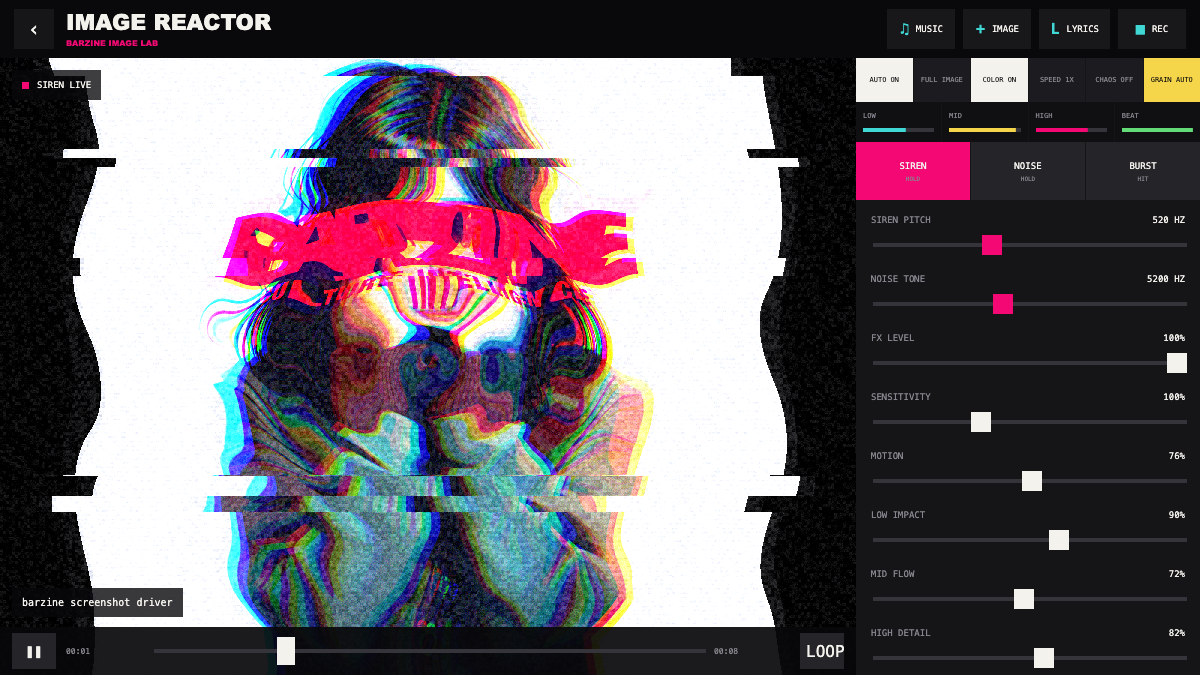
LOW IMPACT follows bass, MID FLOW follows voices and chords, and HIGH DETAIL follows hats and upper frequencies. Set SENSITIVITY and MOTION first, then tune the individual bands.
A music visualizer that analyses low, mid and high frequencies to drive an image, with optional lyrics, live siren and noise effects, and video recording.
MUSIC loads audio, IMAGE loads the background and LYRICS accepts timed text. LOOP repeats playback and SPEED changes playback rate.
Toggle AUTO, COLOR, CHAOS and GRAIN AUTO. Start with AUTO and COLOR only so the track remains readable.
LOW follows kick and bass, MID follows vocals and chords, and HIGH follows hats and detail. Choose one dominant band.
SIREN, NOISE and BURST can be performed over the track. Use SIREN PITCH, NOISE TONE and FX LEVEL to keep them balanced.
Increase LOW IMPACT, keep MID FLOW moderate and reduce HIGH DETAIL so the artwork moves with the kick.
Raise MID FLOW, lower MOTION and keep COLOR controlled so lyrics remain legible.
Keep the base visual stable and add short SIREN or BURST hits only at transitions.
REC saves the canvas and browser audio as WebM. Test the first seconds before a full take, especially when using external audio and timed lyrics.
Start from one preset or one pattern, then adjust only the part you can hear changing.
OPEN TOOL →