16 PADS
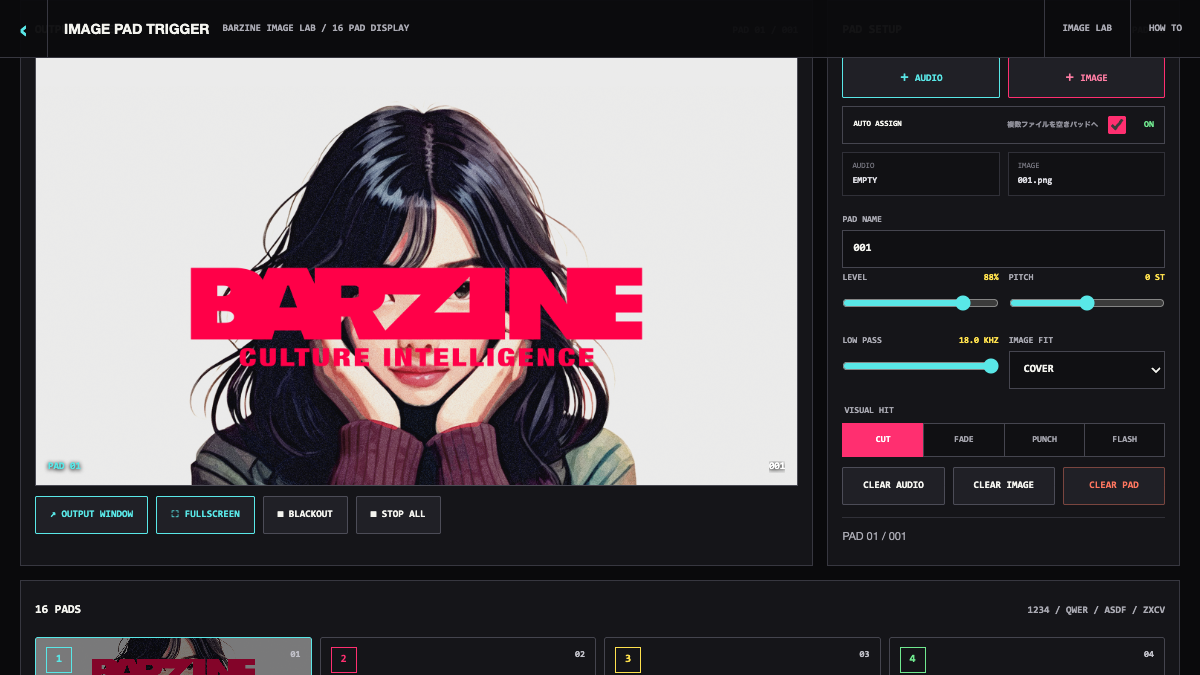
The four rows map to 1234, QWER, ASDF and ZXCV. Triggering a pad sends its assigned sound and image together.

A sixteen-pad audiovisual sampler for sending paired images and sounds to the screen, with CUT, FADE, PUNCH and FLASH transitions plus a separate output window.
This sampler is not for waveform chopping. Put sound and image on the same pad, then fire them together during a stream, live set or recorded visual take.
This sampler is not for waveform chopping. Put sound and image on the same pad, then fire them together during a stream, live set or recorded visual take.
IMAGE PAD TRIGGER assigns images to sixteen pads. Use a separate output window to keep the controls away from the live display.
The four rows map to 1234, QWER, ASDF and ZXCV. Triggering a pad sends its assigned sound and image together.
Place several audio or image files across empty pads without overwriting media already assigned to those pad types.
The stage shows the last triggered image. OUTPUT WINDOW opens a visual-only window that stays in sync with pad performance.
Control overall level, low-pass filtering and echo. Turn off KEEP LAST IMAGE when pads without images should clear the stage.
CUT switches immediately, FADE blends in, PUNCH returns from a larger scale, and FLASH adds a brief burst of light.
STOP ALL silences active sounds and BLACKOUT clears the visual output. Learn both positions before a live take.
Put the most important pads in the upper left. Image-only and audio-only pads are both useful; not every pad needs a pair.
Use CUT for drums and short voice hits, then PUNCH for a low-end drop. Keep FLASH for deliberate cues rather than continuous tapping.
Move OUTPUT WINDOW to the display first, then trigger all sixteen pads once to check orientation, transition and level.
Loaded local images and audio are cleared on reload, and the output window closes. Keep the source files ready and avoid reloading during a live use.
Start from one preset or one pattern, then adjust only the part you can hear changing.
OPEN TOOL →