RIDDIM PRESET
Seven forms provide rule-based starting points from ONE DROP and STEPPERS to UK DUB, SKA and PSYCHEDELIC DUB.

A thirty-two-step reggae sequencer with seven forms, eight tracks, ghost notes, track locks, controlled variation, A/B comparison, history and MIDI or JSON export.
Use the presets as structural starting points. Add low-velocity ghost notes to the gaps in rim, hat and percussion, lock the tracks that must stay, then compare complete two-bar states before export.
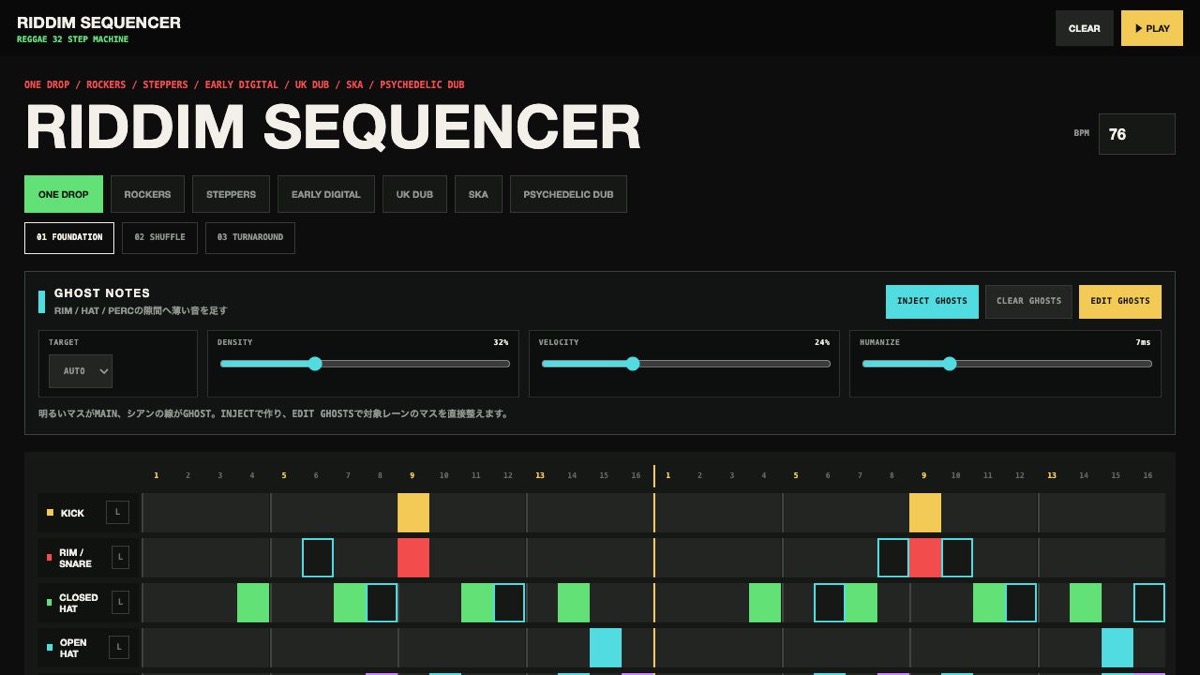
Use the presets as structural starting points. Add low-velocity ghost notes to the gaps in rim, hat and percussion, lock the tracks that must stay, then compare complete two-bar states before export.
RIDDIM SEQUENCER is a browser music tool for building reggae and dub riddims. Start with ONE DROP, ROCKERS or STEPPERS, add ghost notes and offbeat movement across eight tracks, then take the idea out as MIDI or JSON.
Seven forms provide rule-based starting points from ONE DROP and STEPPERS to UK DUB, SKA and PSYCHEDELIC DUB.
The L button protects a track from generation and CLEAR. SUBTLE, ROUGH and WILD control how much of the remaining pattern changes.
Add low-velocity support hits to rim, hat and percussion. DENSITY controls how many appear, VELOCITY controls how quiet they are, and HUMANIZE adds small timing differences. Cyan outlines mark ghosts.
KEY transposes pitched parts, SWING delays even steps and DUB SPACE opens the pattern by changing density and decay.
Undo, history, favourites, A/B and share URLs preserve the full pattern. JSON is for reconstruction; MIDI is for a DAW.
Use 76 BPM, ONE DROP and FOUNDATION. Keep the kick and snare on beat three and avoid overfilling the hats.
Start near 90 BPM with STEPPERS. Keep the quarter-note kick and use only a small amount of swing.
Use 88–100 BPM, EARLY DIGITAL and more DUB SPACE. Leave short, exposed repeats.
MIDI contains performance data rather than audio. JSON and share URLs preserve the tool state. Assign drum, bass and keyboard instruments after importing MIDI into a DAW.
Start from one preset or one pattern, then adjust only the part you can hear changing.
OPEN TOOL →