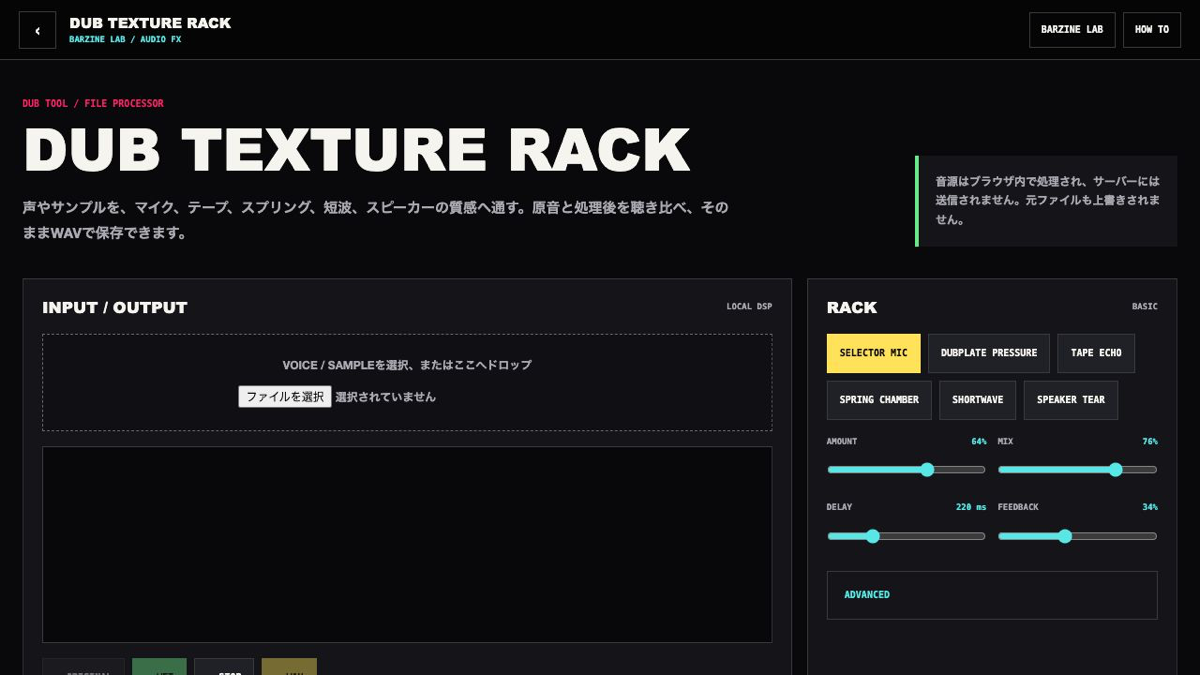
Use the rack to decide whether a voice stays forward, moves into repeats or narrows into a distant radio band.
What this browser tool does
A local browser effects rack for selector mic, dubplate, tape, spring, shortwave and damaged-speaker textures.
First five steps
Load a voice or sample.
Choose one of six texture starting points.
Compare ORIGINAL and WET while setting amount and mix.
Place delay and feedback around the phrase.
Refine advanced controls and export WAV.
Basic controls
AMOUNT / MIX
Amount drives the process; mix balances dry and wet.
DELAY / FEEDBACK
Set repeat spacing and return level.
DRIVE / TONE / CRUSH
Shape saturation, bandwidth and digital roughness one at a time.
WOW / NOISE / SPRING
Add speed drift, floor texture and short metallic space.
Practical setups
Selector mic
Keep consonants present with moderate mix and a short delay.
Tape return
Use light noise, moderate wow and feedback around the middle.
Shortwave
Narrow tone, add moderate crush and leave speech intelligible.
Save and export
Export processed audio and its tail as WAV. Settings can be kept in favourites, A/B, JSON and share URLs.
What this tool does not do
This tool focuses on one sound or pattern task rather than final mixing.
Keep output level conservative before pushing feedback, drive or repeated effects.
FAQ
Is it free?
DUB TEXTURE RACK is free to use in the browser.
Do I need to install anything?
No. Open the tool in a current browser to start.
Can I save or export the result?
Export processed audio and its tail as WAV. Settings can be kept in favourites, A/B, JSON and share URLs.
What should I try first if it does not work?
Test with a short source before processing a long file.
Troubleshooting
Test with a short source before processing a long file.
Compare peaks when WET seems quieter.
Lower drive, amount and crush when distortion is excessive.
Reload the same source after opening a shared state URL.
Next tools
How to use DUB SIREN DECKA browser-based dub siren with oscillator, ZAP, LFO, filter, echo, reverb, built-in riddims and recording in one performance deck.
How to use CHIP SIREN 8An 8-bit siren machine with four tracks, a 16-step sequencer, chip voices, live FIRE and BURST pads, echo and browser recording.
How to use DUB SIREN CLASSICA focused dub siren interface for waveform, LFO, ZAP, filter, echo, reverb, hold effects, BPM looping and recording.
OPEN DUB TEXTURE RACK
Start from one preset or one pattern, then adjust only the part you can hear changing.