
DUBWISE BUTTON
Hit it. The band drops out. The dub remains.
The DUB SIREN you could play in a browser is now real studio gear for your DAW. Two units: a siren synth you perform, and an effect that turns any track into dub.
The heart of it is the DUBWISE button on the FX unit. It never touches your dry signal — until you press it. Then the band disappears and the last phrase keeps circling in the echo. The move dub engineers pulled on the mixing desk, on one button.
INSTRUMENT
DUB SIREN — the synth
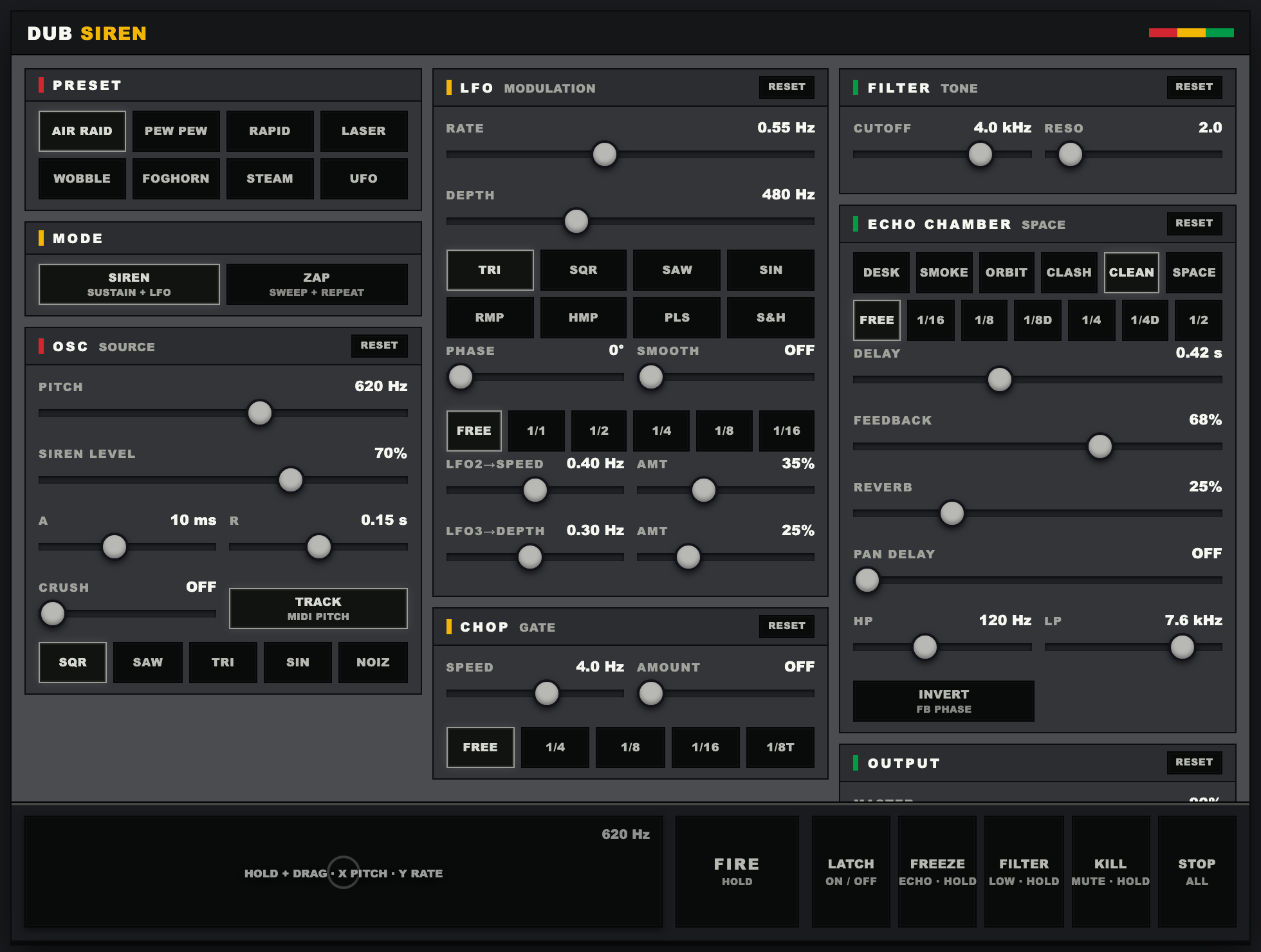
- SIREN (sustain + LFO) and ZAP (repeating downward sweep) modes
- Five waveforms — SQR / SAW / TRI / SIN / NOIZ; the square and saw are band-limited
- Eight LFO shapes (TRI / SQR / SAW / SIN / RMP / HMP / PLS / S&H) with rate, depth and phase
- LFO2 bends the LFO's speed and LFO3 breathes its depth — the unsteadiness of a hand-swung siren
- CHOP rhythmic gate, A/R envelope, CRUSH, LP / HP / BP filter
- Stereo echo chamber. PAN DELAY opens the taps apart, plus reverb and feedback phase invert
- Six echo characters — DESK / SMOKE / ORBIT / CLASH / CLEAN / SPACE
- LFO, chop and delay lock to host tempo (1/1 to 1/16)
- XY pad — hold and drag: pitch on X, LFO rate on Y
- FIRE / LATCH / FREEZE / KILL / STOP ALL performance controls
- MIDI notes drive the siren pitch (monophonic), with velocity and pitch bend
DOWNLOAD
Play the beta
The synth beta is free. AU and VST3 for macOS 15.7 or later on Apple Silicon. It is not signed with an Apple Developer ID, so macOS will warn you the first time. The FAQ below has the two ways around it.
Download DUB SIREN v0.2.0 (3.4MB / macOS 15.7+)- Formats: AU / VST3
- Platform: macOS 15.7 or later, Apple Silicon (arm64)
- Intel Mac: not supported
Windows VST3 — in preparation
A VST3 build for Windows 10/11 (64-bit) is being prepared. The release package will unpack and install with one double-click on install-windows.cmd. There will be no download link until it has been checked on real Windows DAWs.
EFFECT / EARLY BUILD
DUB SIREN FX — any track becomes dub
An early FX build is now in place. It is not part of the current macOS beta zip yet. The native input effect is being checked before a DAW download is published.

- DUBWISE (hold to cut the dry signal and keep the delay) and FREEZE (stop the input while feedback keeps moving)
- KILL EQ drops LOW, MID, HIGH, or combined bands
- Independent delay time, feedback, ECHO MIX, ECHO HP / LP controls
- SPRING, DRY and OUTPUT controls in an input audio effect
- Native AU / VST3 target. Pre-release validation only; no download yet
TRY FIRST
Play it in your browser
The web version is free. No install — it plays on desktop and phones. Consider it the taster for the plugin sound.
Play the free web DUB SIRENRELEASE
Release info
The synth beta is free to download now. The FX plugin and the full release will be announced on X (@BARZINE_NEWS).
- Formats: AU / VST3
- Platform: macOS 15.7 or later (Apple Silicon). Intel Mac not supported
- Windows VST3: in preparation
- Made by BARZINE LAB
FAQ
Questions
macOS says it "cannot be opened because the developer cannot be verified"
The beta is not signed with an Apple Developer ID, so macOS blocks it the first time. The install.command in the zip clears this for you, but here are two manual routes.
From the Terminal — run these two lines.
xattr -dr com.apple.quarantine ~/Library/Audio/Plug-Ins/Components/"DUB SIREN.component"
xattr -dr com.apple.quarantine ~/Library/Audio/Plug-Ins/VST3/"DUB SIREN.vst3"
From System Settings — right after your DAW's scan rejects it, open System Settings → Privacy & Security. Near the bottom you will see a note about "DUB SIREN". Click Allow Anyway, then restart your DAW.
Where do the files go?
Double-click install.command in the zip and it copies the AU and VST3 into place and clears the Gatekeeper flag in one go. Then restart your DAW and rescan.
To do it by hand: in Finder press Shift+Command+G, paste each path, and copy the matching file in.
AU   : ~/Library/Audio/Plug-Ins/Components/
VST3 : ~/Library/Audio/Plug-Ins/VST3/
Going the manual route, don't forget to clear the Gatekeeper flag afterwards.
My DAW doesn't list the plugin
Until the Gatekeeper flag is cleared, a DAW's scan rejects the plugin without warning you — which is why it looks like nothing happened at all. Run install.command, or clear it by hand as above, then rescan.
Logic Pro remembers plugins that failed a scan, so always rescan after clearing it, and quit the DAW fully before reopening.
Which macOS versions are supported?
The current beta requires macOS 15.7 or later on Apple Silicon (arm64). macOS 15.6 and earlier and Intel Macs are not supported.
Is there a Windows build?
The current download requires macOS 15.7 or later on Apple Silicon (arm64). A Windows 10/11 (64-bit) VST3 build is in preparation. The release package will install to the standard VST3 folder through install-windows.cmd after it has been tested in real Windows DAWs. Intel Macs are not supported either.
AU or VST3 — which one?
Same plugin inside. Pick whichever your DAW uses. Logic Pro and GarageBand take AU only. Ableton Live, Cubase, Studio One, REAPER and FL Studio run VST3. Installing both is fine.
Can I play it from MIDI?
Yes. Send MIDI notes and the siren pitch follows the note. It is monophonic, so no chords. Velocity sets the level, and the pitch wheel bends two semitones either way.
What do the buttons other than FIRE do?
LATCH holds the siren on until you press it again. FREEZE traps the echo and keeps it circling while held. KILL ducks the sound into a muffled low while held — the echo tail keeps breathing underneath. STOP ALL clears everything.
The dark panel below them is the XY pad. Hold and drag it to sweep pitch across and LFO rate up and down at once. It sounds only while held.
What separates the six echo characters?
They voice the delay rather than recall a preset, so your own HP / LP and delay time stay put.
DESK is a plain mixing-desk send and CLEAN is the same thing with no colour at all. SMOKE is dark and saturated. ORBIT drifts slowly in pitch. CLASH is bright and driven. SPACE lays on deep tape-echo wow.
Can I break it with too much feedback?
No. A dub delay is meant to self-oscillate, so the ceiling is left open — but the output saturates, so pushing it hard sounds like tape being overdriven rather than a converter clipping.
How is this different from the browser version?
The browser version is the quick one — nothing to install, it just plays. The plugin sits on a track in your DAW, mixes with everything else, and records its moves to automation. Start with the browser version.
How long is the beta free?
Free for as long as it is a beta. Presets and parameters may still change, so a project saved with this build isn't guaranteed to reopen identically in the next one.
I found a bug
Send it through contact with your DAW, your macOS version, and the steps to reproduce it.