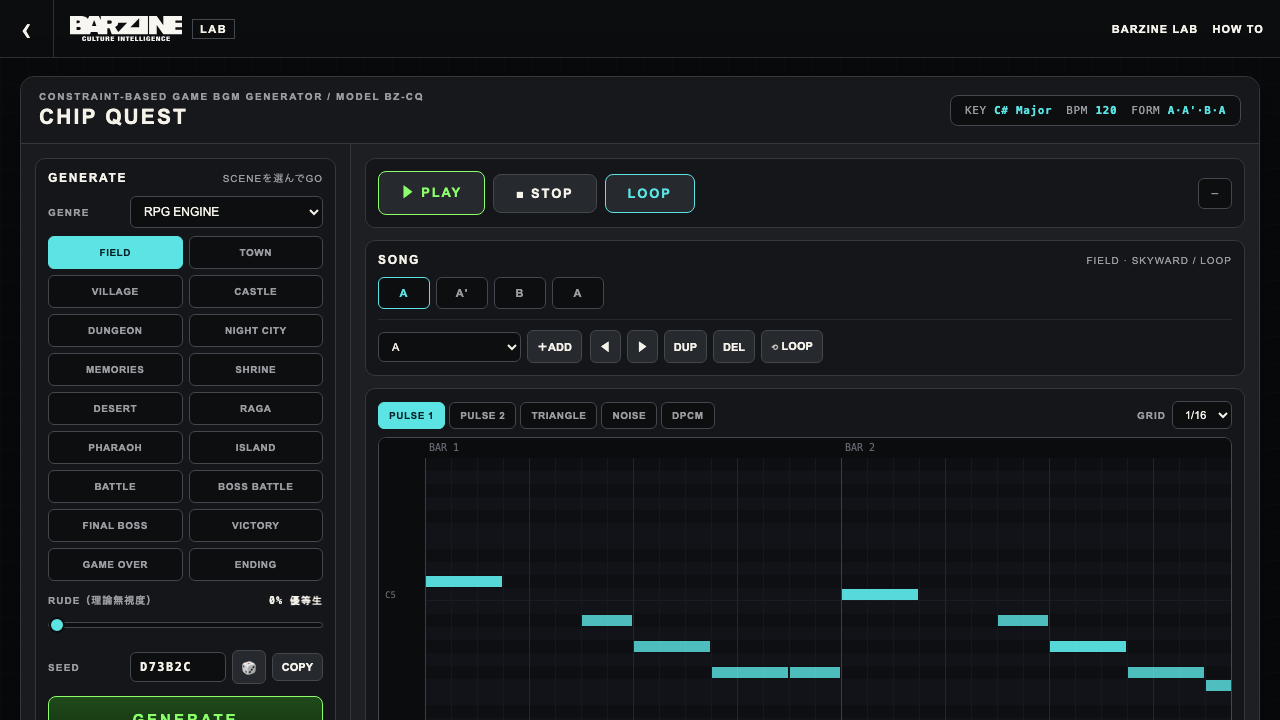
GENRE / SCENE
Eight engines and 79 scenes: RPG (24 scenes from overture and field to Japanese shrine, desert, raga, dancer, pharaoh and flashback), ACTION (10), SHOOTER (9), PUZZLE (7), HORROR (8), POP (6), RIDDIM (4) and DANCE (11). Every scene composes with its own tempo range, scale pool, progressions, rhythm density and drum style, and section length follows the progression: 4, 8 or 12 bars.
STYLE
Pins a scene variant: BATTLE's RUSH/GALLOP/PRESSURE, BOSS's COLOSSAL/DREAD/SIEGE, and so on. AUTO lets the seed choose; picking a name locks it.
PROG / DEGREES
Chord progression selection: AXIS, Royal Road, Komuro, Canon, a 12-bar blues, Marusa (Just the Two of Us, with its III7 color) and more. Bright progressions steer the scale to the major side. CUSTOM accepts 2-16 degrees (1-7) and its length becomes the bar count.
KEY / BPM / LENGTH
Changing KEY transposes the same song. BPM applies instantly without regenerating. LENGTH sets the skeleton: SHORT is one section, MEDIUM is A-A'-B-A, LONG grows to A-A'-B-A-C-A'.
SEED
The seed drives generation: same seed and settings, same song. Reroll with the dice, copy it, or use COPY URL to share the entire state including manual edits.
RUDE
How much music theory to ignore. 0% keeps chord tones on strong beats and resolves cadences; around 30% beats start slipping; at 60% out-of-scale notes and unresolved endings creep in; 100% even swaps chords without asking. The value travels in the share URL.
REGENERATE
Rebuild MELODY, HARMONY, BASS, DRUM or DPCM separately. Regenerating the bass does not move a single melody note. Only a HARMONY regenerate makes melody and bass re-derive to follow the new chords.
LOCK
Six locks - KEY, BPM, CHORD, MELODY, BASS, DRUM. Locked elements survive GENERATE, so you can keep a bass you love and gamble everything else.
SONG MODE
Arrange the form: +ADD inserts a section (NEW generates fresh material D-H), DUP duplicates, DEL removes, arrows reorder, up to 12 sections. LOOP makes playback loop from the selected section, so the head plays once as an intro. The arrangement travels in the share URL and project file.
PIANO ROLL
Switch tracks with the tabs. Click to add, drag to move, drag the right edge for length, double-click or Delete to remove, slider for velocity. GRID goes 1/4 to 1/32. NOISE and DPCM show as drum lanes. Edits apply from the next playback.
MIXER / SOUND
Each track has VOL, PAN, MUTE and SOLO. DUTY is the pulse width: 12.5% is thin and reedy, 50% is the fat square. AUTO uses each scene's own setting.
DUB MODE
BARZINE's own echo chamber with a send per track. TIME is the echo spacing, FEEDBACK the repeats, FILTER the darkness of the returns, REVERB the tail. If every SEND is at zero nothing happens - raise PULSE 1's send first.
EXPORT
MIDI exports five tracks (PULSE 1/2, TRIANGLE, NOISE, DPCM) with tempo and swing. WAV renders the mix, STEMS renders five separate files, PROJECT saves the complete state as JSON and LOAD PROJECT restores it fully.
RIDDIM ENGINE
The four reggae-style scenes are all generated from rules, with per-scene swing. The seven scenes transcribed from real riddims, such as SLENG TENG, have moved to RIDDIM MACHINE.
Scene catalog: RPG (24)
OVERTURE OF HOPE is a bright fanfare (MARCH, SUNRISE or BRAVE); WISTFUL JOURNEY sings in minor over a dance rhythm; MIST WORLD falls through a quiet flashback; ROMANI DANCE bounces with ornaments; SKY BATTLE runs on sixteenth arpeggios; FIELD pushes forward; TOWN rests; VILLAGE keeps notes scarce; CASTLE holds solemn pedals; DUNGEON leans on semitones and rests; NIGHT CITY is melancholic four-on-the-floor; MEMORIES is a flashback; SHRINE uses real Japanese scales; DESERT rides a caravan; RAGA drones with ornaments; DANCER whirls in harmonic minor (WHIRL, VEIL or FIESTA); PHARAOH contrasts low growls and high cries; ISLAND covers one drop, ska and dub; BATTLE sprints; BOSS BATTLE is vast and fearsome; FINAL BOSS opens with an intro; VICTORY and GAME OVER are jingles; ENDING shifts with MOOD.
Scene catalog: ACTION / SHOOTER
ACTION: STAGE 1 (TURBO runs or CAVERN depths), crystalline ICE STAGE, stop-and-go STEALTH, machine-like FACTORY, floating SKY STAGE, ostinato UNDERGROUND, swaying WATER ZONE, BOSS RUSH, and STAGE CLEAR / MISS jingles. SHOOTER: launching LAUNCH, spacious STAR CRUISE, hard-hitting AMBUSH, sixteenth-note EVACUATION, syncopated ASTEROID BELT, quiet NEBULA, war-march WARNING, register-contrast FINAL ZONE, and an AREA CLEAR jingle.
Scene catalog: PUZZLE / HORROR
PUZZLE: bouncing THINKING, slow COFFEE BREAK, springy CHAIN REACTION, ticking TIME ATTACK, accelerating SPEED UP, four-on-the-floor VS MODE, LEVEL CLEAR jingle. HORROR: hushed MANSION, droning INVESTIGATION, uneasy DOLL HOUSE, heavy NIGHTMARE, chromatic CHASE, brief relief in SAFE ROOM, drum-and-exotic-scale RITUAL, and the descending DEAD END jingle.
Scene catalog: POP (6)
OPENING sprints like a theme song (ANISON adds 16th runs); IDOL is four-on-the-floor royal-road pop; CITY POP leans Marusa-noir (NIGHT DRIVE / RAIN); EUROBEAT rides an octave bass at speed; KAWAII bounces; BALLAD is where the Canon progression shines, with a register-contrast FINALE. The progression library works hardest here.
Scene catalog: RIDDIM (4)
ONE DROP YARD drops kick and snare on beat three; STEPPERS is four-on-the-floor reggae; SKA PARK sprints on upbeats; DUB CHAMBER subtracts, made for DUB MODE.
Scene catalog: DANCE (11)
Dance-music grammar played on 8-bit sound. HOUSE: four-on-the-floor and seventh stabs. TECHNO: sixteenth hats and one looping phrase. DISCO: octave-hopping bass. EUROBEAT: bouncing bass and fast arpeggios. FUNK: ghost notes and a bass that bounces on rests. BOOM BAP: heavy kicks and swing. 2-STEP: skipping kicks and a sixteenth swing. JUNGLE: a fast break over a long bass. JERSEY CLUB: the five-hit kick. DANCEHALL: a 3+3+2 kick. DUBSTEP: snare on three and a wobbling bass. In most scenes B is a breakdown that strips back and builds, and the next A drops back in.